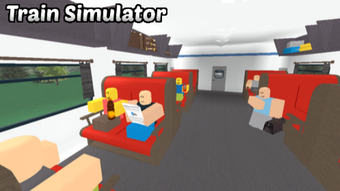

Free Roblox Train Simulator Experience
Overview
Train Simulator 2020 is a free desktop application designed for the Roblox platform, developed by Derpie Studios. It falls within the Utilities category and offers users a simulated rail transport experience within the Roblox ecosystem. The software allows players to explore train operation mechanics, including starting engines, navigating tracks, and managing basic station interactions. It is intended for Roblox users seeking immersive, gameplay-focused simulation experiences without the need for external software or complex installations.
The application is accessible to casual gamers and Roblox enthusiasts who enjoy creative, interactive environments. It serves as a tool for entertainment and experimentation, particularly for those interested in transportation systems and virtual train operations. Given its integration with Roblox, users can expect a community-driven experience with potential for shared multiplayer scenarios, though specific multiplayer features were not detailed in the provided information.
Released on August 2, 2022, Train Simulator 2020 is positioned as a lightweight utility within the Roblox library. The developer did not provide additional context about the project’s development goals or long-term roadmap. Despite the absence of detailed system requirements, the software is compatible with both Windows and Mac operating systems, suggesting broad accessibility for desktop users.
Key Features & Capabilities
- Roblox-Based Simulation – Built specifically for the Roblox platform, allowing seamless integration with existing Roblox accounts and environments.
- Train Operation Mechanics – Users can engage with basic train controls such as starting the engine, accelerating, braking, and managing station stops.
- Immersive Rail Environment – Designed to replicate real-world train travel through visual and interactive track layouts.
- Free Access – No cost to download or use, making it accessible to a wide audience of Roblox players.
- English Language Support – The application is available exclusively in English, ensuring clarity for a global user base.
These features enable users to experiment with train operation in a virtual space, ideal for those exploring simulation mechanics or enhancing their Roblox gameplay experience. The simulator supports individual play sessions or potential group interactions, depending on how the environment is configured by the developer. Since the software operates within Roblox, it inherits the platform’s infrastructure for user interaction, which may include chat, shared worlds, and dynamic events.
User Interface, Workflow & Performance
The user interface of Train Simulator 2020 is designed to align with Roblox’s standard UI framework, featuring intuitive controls and visual feedback. Navigation within the application is handled through Roblox’s built-in menu system, with options accessible via on-screen buttons or keyboard shortcuts. The workflow is streamlined for quick access to train controls, allowing users to start, operate, and stop the train with minimal setup time.
Performance is expected to be consistent with typical Roblox experiences, relying on the platform’s runtime environment. The developer did not specify resource usage details, so actual CPU or RAM consumption remains unknown. However, given the software’s classification as a lightweight utility, it likely imposes minimal system demands. Stability is anticipated to mirror Roblox’s general reliability, though this may vary depending on the user’s device and internet connection.
Since the software runs within the Roblox environment, performance may be influenced by the user’s device capabilities and network speed. The developer did not provide performance benchmarks or optimization notes. General software behavior patterns suggest that users with standard desktop hardware should experience smooth operation, though intensive multitasking may affect responsiveness.
Compatibility & System Requirements
Train Simulator 2020 is compatible with both Windows and Mac operating systems, allowing broad accessibility across desktop platforms. The software is distributed through the Roblox platform, meaning it does not require a standalone installer or traditional desktop installation process. Instead, users access it directly via the Roblox client.
The current version of the software is listed as 0, which may indicate an early release or placeholder version. The file size is reported as 0.0 MB, suggesting that the application is delivered dynamically through Roblox’s runtime system rather than as a downloadable file. This is consistent with how most Roblox experiences are distributed.
Exact system requirements were not listed. The developer did not provide information about minimum hardware specifications, such as processor speed, RAM, or graphics capabilities. Compatibility information is limited to the operating systems, with no details on supported GPU models or memory thresholds. Users are advised to ensure their device meets general Roblox system requirements for optimal performance.
Pros and Cons
Pros
- Free to download and use, eliminating cost barriers for users.
- Integrated with Roblox, offering easy access through a familiar platform.
- Simple interface tailored for quick onboarding and gameplay.
- Designed for fans of simulation and train-based games.
- Available on both Windows and Mac systems.
Cons
- Version number is listed as 0, which may suggest incomplete or early-stage development.
- No official system requirements provided, limiting user preparedness.
- File size listed as 0.0 MB, indicating a dynamic delivery model without standalone installation.
- Only available in English, which may limit accessibility for non-English speakers.
- Performance details and stability metrics were not disclosed.
FAQ Section
Is Train Simulator 2020 available for free?
Yes, Train Simulator 2020 is a free application available on the Roblox platform. No payment is required to access or use the software.
What operating systems does it support?
Train Simulator 2020 is compatible with both Windows and Mac operating systems. It runs through the Roblox client, which supports these platforms.
Do I need to install anything to use it?
No standalone installation is required. The software is delivered through the Roblox platform and runs within the Roblox client environment.
Is the software secure to use?
As a Roblox experience, Train Simulator 2020 operates within the platform’s secure environment. Users should follow standard safety practices, such as avoiding third-party scripts or unverified links.
Can I play it offline?
Roblox experiences, including Train Simulator 2020, require an active internet connection to function. Offline play is not supported.
Final Thoughts
Train Simulator 2020 offers a straightforward, accessible train simulation experience tailored for Roblox users. Its free model and integration with a major gaming platform make it a low-risk option for fans of rail transport and virtual simulation. While the software lacks detailed system specifications and has a version number of 0, its presence on Roblox ensures broad accessibility and ease of use.
For casual gamers and Roblox enthusiasts seeking fun, interactive gameplay, this tool delivers on its core promise. The absence of advanced features or detailed performance data does not detract from its value as a simple, enjoyable experience. The developer, Derpie Studios, has created a utility that fits well within the Roblox ecosystem, targeting users who appreciate simulation mechanics and creative play.
Download Train Simulator 2020 now to explore the rails and enjoy a free, immersive simulation experience.







